
Learn With Me is a series where I write about a process, tool or similar that I need to learn for my current UX position. On today’s agenda are decision tress.
This week I needed to define a set of rules or conditions for an upcoming feature. Decision trees are not necessarily part of my daily UX tasks and normally, you see developers work with this logic structure. As I was collaborating with our ENG (engineering) team, the best way to describe the feature logic was the decision tree about which I did not know much. So I did what I do best – research and learn.
Decisions trees come in different shapes and forms. Ultimately, its appearance depends on what you need to convey. A basic structure of a flowchart has three nodes that make up a structure: decision, chance and end nodes.
Example:
I needed to define the behavior for iOS and Android review functions, where users should be prompted to leave an app-store review after they successfully completed their ride, e.g. if condition X is true, then show survey.
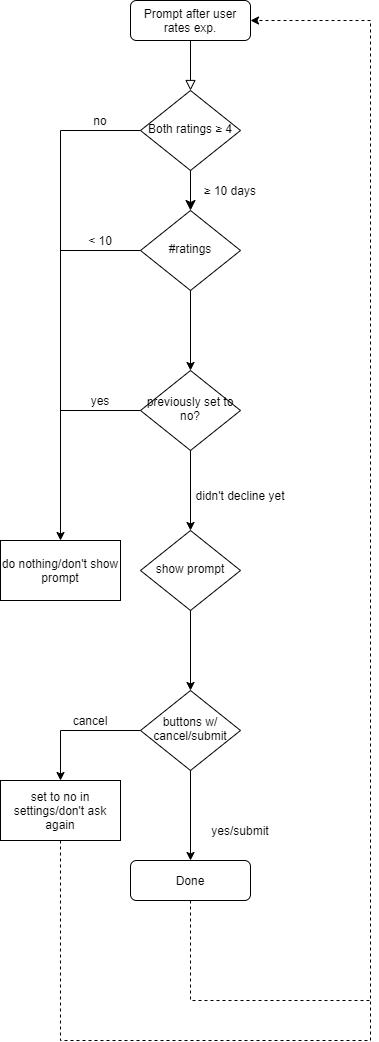
I highly recommend using https://www.diagrams.net/ application to create decision diagrams, as it’s free to use, comes with a number of different features, and it can be integrated into a Google Suite.
 Playful Brain Demand